From 4 Leads a Month to 4 Leads a Week —How CRO Turned InterTeam's Website Into Their #1 Lead Source
The Starting Point: A Traffic Machine With a Leaky Bucket
InterTeam didn't have a traffic problem.
Their SEO was running. Their ads were running. People were landing on the website every single day. But leads? 4 to 5 a month. For a growth agency that sells lead generation to SaaS companies — that number is painful, and it's honestly a little ironic.
When I looked under the hood for the first time, the problem was obvious. Just not to anyone who wasn't looking for it.
The previous developer had left behind what I can only describe as spaghetti development — disorganised code, bloated assets, no structure, no logic to the component architecture. The website was loading in 6+ seconds. There was zero tracking in place — no heatmaps, no session recordings, no click data. Nobody knew where visitors were going, what they were clicking, or where they were dropping off.
They were driving traffic into a hole. And the hole had no name, no data, no fix — yet.

The Audit: What the Data Actually Showed Us
Before touching anything on the website, we needed to see what was really happening.
First thing we did: install Microsoft Clarity — session recordings, heatmaps, click tracking. Then we set up Google Tag Manager properly, so every interaction could be tracked and measured going forward.
What came back from those first recordings was uncomfortable, but not surprising.
Visitors were scrolling, hesitating, clicking on things that weren't clickable, and then quietly leaving. No rage clicks. No obvious frustration. Just people hitting invisible dead ends and moving on. And that's almost worse than rage clicks — because there's nothing loud to blame.
Here's what the audit flagged:
- ⚠️ Page Speed Score: ~40. Industry benchmark for conversions is 90+.
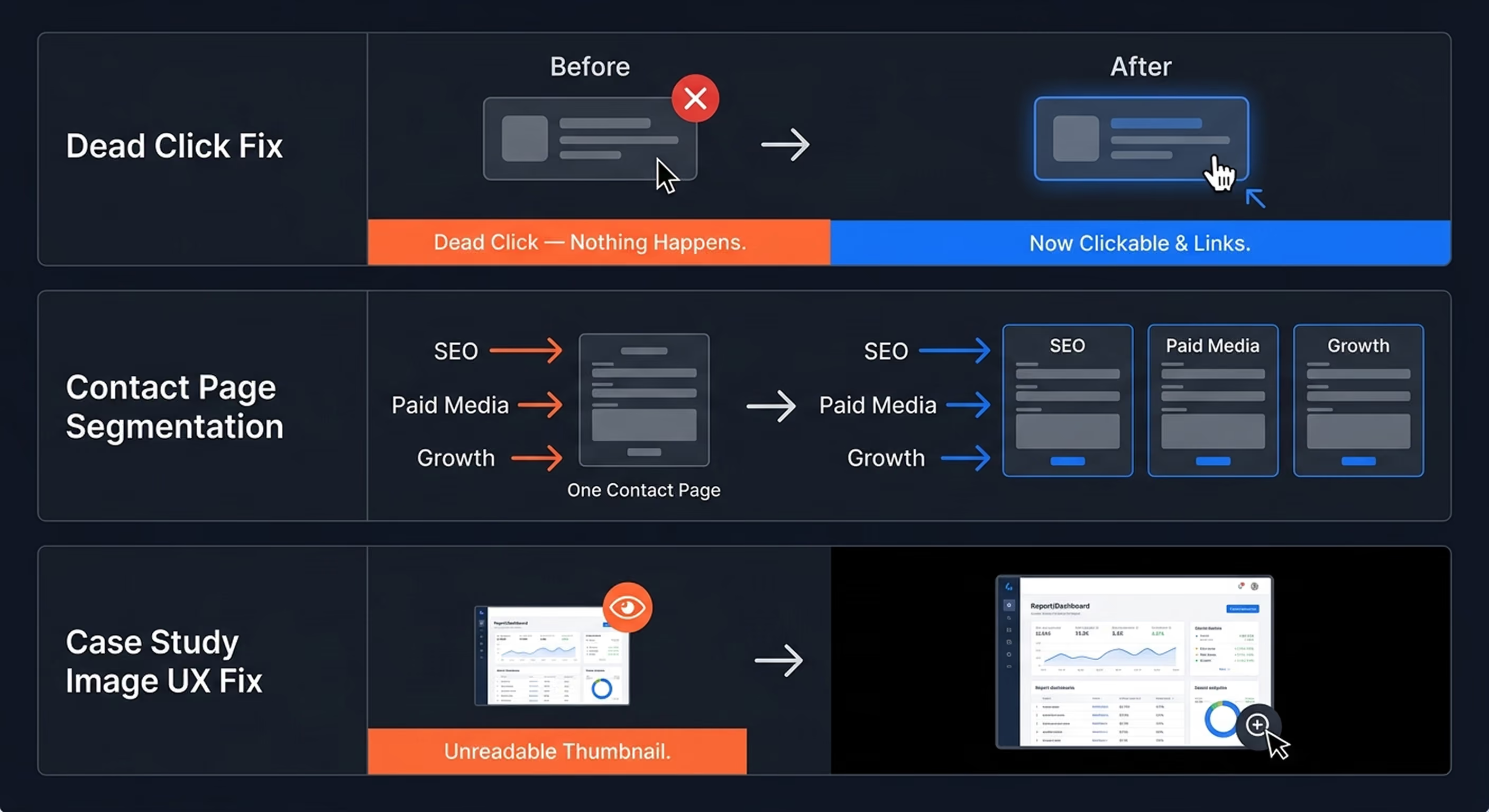
- ⚠️ Dead Clicks everywhere. Cards that looked interactive — weren't. Visitors clicked, nothing happened.
- ⚠️ Zero behavioural tracking. No visibility on what visitors were doing before we arrived.
- ⚠️ One generic contact page for everything. Whether you wanted SEO, paid media, or full-service growth — same form, same page.
- ⚠️ Spaghetti codebase. Inherited from the previous developer. Inefficient, slow, fragile.
Every one of these had a conversion cost. Combined, they were quietly bleeding the business every single day.

Phase 1: Fix the Foundation — You Can't Optimise What's Broken
There's a version of this story where we jump straight into A/B testing and call it CRO.
That's not what happened. And it's not how CRO actually works.
Before any experiment, any test, any optimisation — the website needed to function properly. So the first phase was a complete rebuild of the Webflow codebase. Cleaned out the inherited mess, reorganised the component architecture, compressed and optimised assets, eliminated everything that was adding load time without adding value.
The result: PageSpeed went from the low 40s to 90+.
Here's why that number matters more than people expect.
Research consistently shows that a 1-second delay in load time can reduce conversions by 7% or more. InterTeam's website was loading in 6+ seconds. By the time the page finished loading, a percentage of visitors had already lost trust — or already closed the tab. They never even got to see the offer.
Getting to 90+ wasn't just a technical milestone. It was a conversion fix. And it happened before a single A/B test ran.

Phase 2: Install the Tracking — Because You Can't Test What You Can't See
Once the technical foundation was solid, we built the data layer.
Most websites are running completely blind. Google Analytics gives you traffic numbers, bounce rates, session counts. What it doesn't tell you is why someone left. To run real CRO, you need to see your visitors — not just count them.
Here's what we set up:
- Microsoft Clarity — session recordings, heatmaps, scroll maps, rage and dead click detection
- Google Tag Manager — clean, structured event tracking across every key interaction on the site
- Conversion tracking on all critical touchpoints — form submissions, CTA clicks, scroll depth, button interactions
This layer was non-negotiable. Every decision that came after — every A/B test, every UX fix, every CRO recommendation — was based on real behavioural data from real visitors. Not assumptions. Not best practice generic advice. Patterns from the recordings, confirmed by the numbers.
If you don't have this setup in place, you're not doing CRO. You're guessing.

Phase 3: CRO in Action — What We Actually Tested and Fixed
With the foundation solid and the tracking live, the real work started.
No random changes. No gut-feel redesigns. Every experiment had a hypothesis, a structured test, and a measured result. Weekly reports tracked what was running, what we'd learned, and what was next.
Here's what we worked through systematically.
The Homepage Header
The header is where most visitors make their stay-or-leave decision — in under 5 seconds. We ran multiple A/B tests across:
- The main H1 (testing pain-point angles vs. outcome-driven angles vs. direct value statements)
- CTA button copy — what verb, what promise, what creates urgency without sounding desperate
- Header visuals — static imagery vs. abstract vs. social proof elements
Each test ran until statistical significance. Then we moved to the next hypothesis.
Dead Clicks — The Invisible Conversion Killer
Clarity sessions flagged something specific: card elements on multiple pages were getting clicked consistently — but weren't linked to anything. Visitors were trying to navigate. They hit a dead end. They left.
We added proper animations and navigation behaviour to the card components. Now when someone clicked, they went somewhere useful.
A fix that took hours. A result that moved conversion metrics immediately.
The Contact Page Segmentation — Biggest Single Win
This one isn't glamorous. But it's probably the highest-impact structural change we made.
InterTeam had one contact page. Everyone went there — regardless of which service they'd been reading about. Whether you were interested in SEO, paid media, or full-service growth management, you landed on the same generic form with the same generic copy.
We built separate, purpose-built contact pages for each service.
If you arrived from the SEO service page, you landed on an SEO-specific contact page. Copy that confirmed you were in the right place. Social proof relevant to that outcome. A form pre-framed around what you'd already been reading.
Matching the contact experience to visitor intent isn't a trick. It's just good UX. And it converts.
The UX Details Most Businesses Ignore
This is where session recordings pay off in ways most people never think about.
- Paragraph spacing — tighter spacing makes visitors uncomfortable. They scroll faster, read less, trust less. You won't notice it consciously. Your conversion rate will.
- Heading hierarchy — wrong sizing and weight disrupts the reading flow. Visitors lose the thread and stop reading.
- Case study images — InterTeam had detailed screenshots in their case studies with results and numbers. They were too small to read. We added a click-to-zoom lightbox — a black overlay, full-screen image, zoom-in capability. Now visitors could actually engage with the proof they'd clicked to see.
- Mobile behaviour — elements stacking incorrectly, CTAs dropping out of viewport, critical copy getting buried on smaller screens.
None of these are dramatic changes. But they compound. Fix enough of them and you see 10–14% conversion improvements across the board — without a single new traffic source or ad campaign.
Phase 4: Taking the Same System to InterTeam's Clients
By this point, the engagement had expanded beyond InterTeam's own website.
As one of North America's top growth agencies, they were running campaigns and managing landing pages for multiple SaaS and B2B software clients. My role expanded into their delivery operation — working directly on client accounts alongside their team.
This included:
- CRO Audits for new client accounts — identifying what was killing conversions before campaigns went live
- Landing page builds — high-converting, properly tracked, fast-loading pages in Webflow
- Google Tag Manager setup across client properties — ensuring the right events fired before any optimisation work started
- A/B testing infrastructure — heat maps, dead click detection, scroll tracking all live before the first test ran
- Meta SEO implementation — Open Graph tags, structured title tags, schema — the stuff that determines how a page looks in search results and social feeds before anyone even clicks
The same structured CRO framework we applied to InterTeam's site was now running across their client accounts. The results followed the system.
Across client accounts, minimum conversion lifts ranged from +47% to +218% — depending on the offer, the starting baseline, and the traffic quality coming in.
One client's landing pages contributed to over $100,000 in generated revenue in the first 60 days after launch. (Shoutout to their marketing team for driving the traffic. We focused on making sure the page didn't waste it.)
The Results — Let's Put the Numbers Together
By the end of the engagement, the picture looked like this:
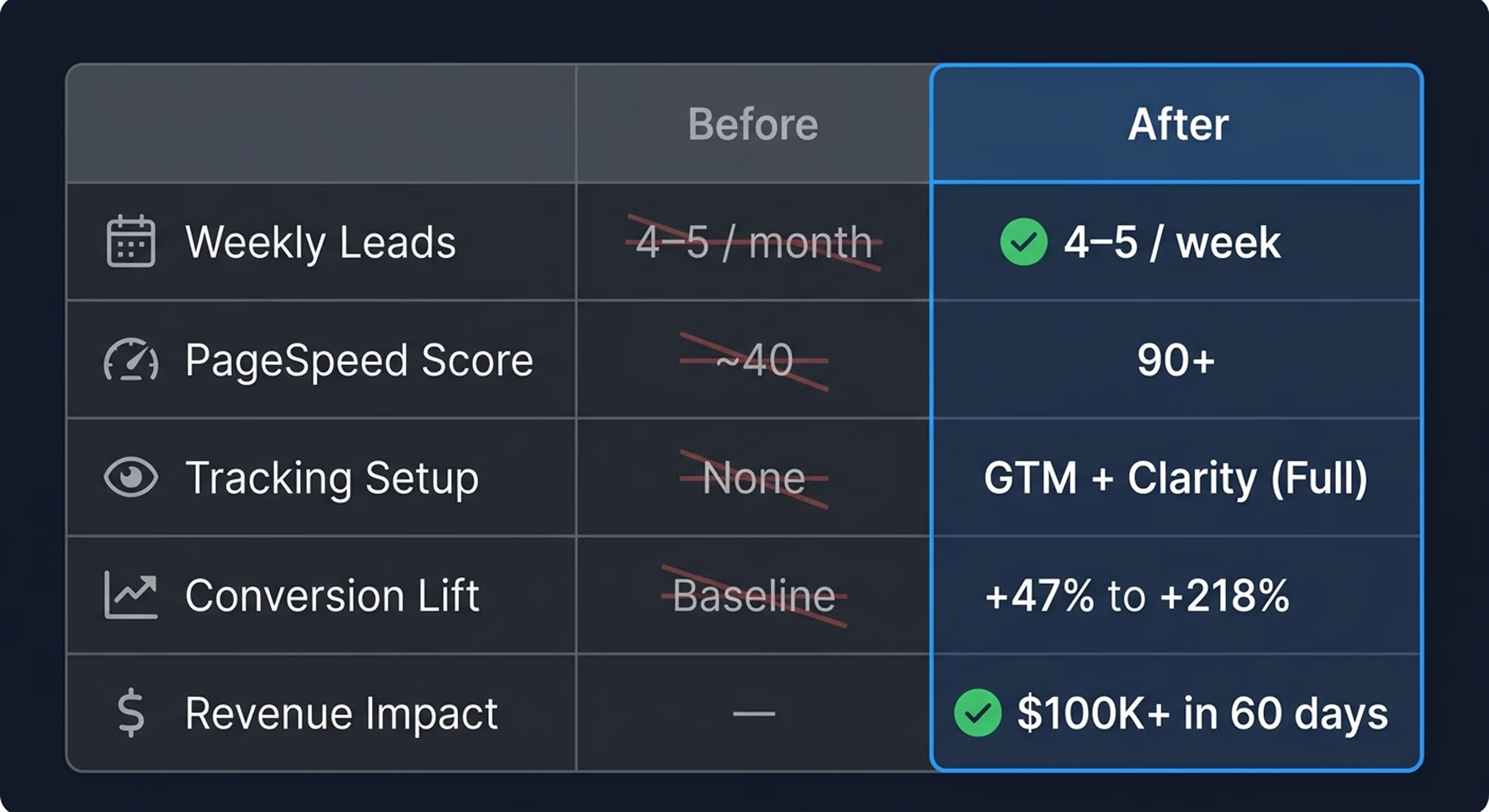
That's a 4x increase in weekly lead volume — from the same traffic.
No new ad budget. No new traffic source. No new offer. Just a website that finally did the job it was supposed to do.
And this is the part most businesses miss: the leads that InterTeam was losing before weren't lost because of bad marketing. They were lost because the website wasn't built to convert. The traffic was there the whole time.
What This Means If You're Reading This as a CEO or Business Owner
Traffic is a starting point. Conversion is the finish line.
Most businesses invest heavily in getting people to their website — SEO, ads, content — and assume the website will handle the rest. It won't. Not unless it's been properly audited, properly tracked, and systematically optimised.
What we did for InterTeam wasn't complicated in theory. But it required a system — and the discipline to run it properly.
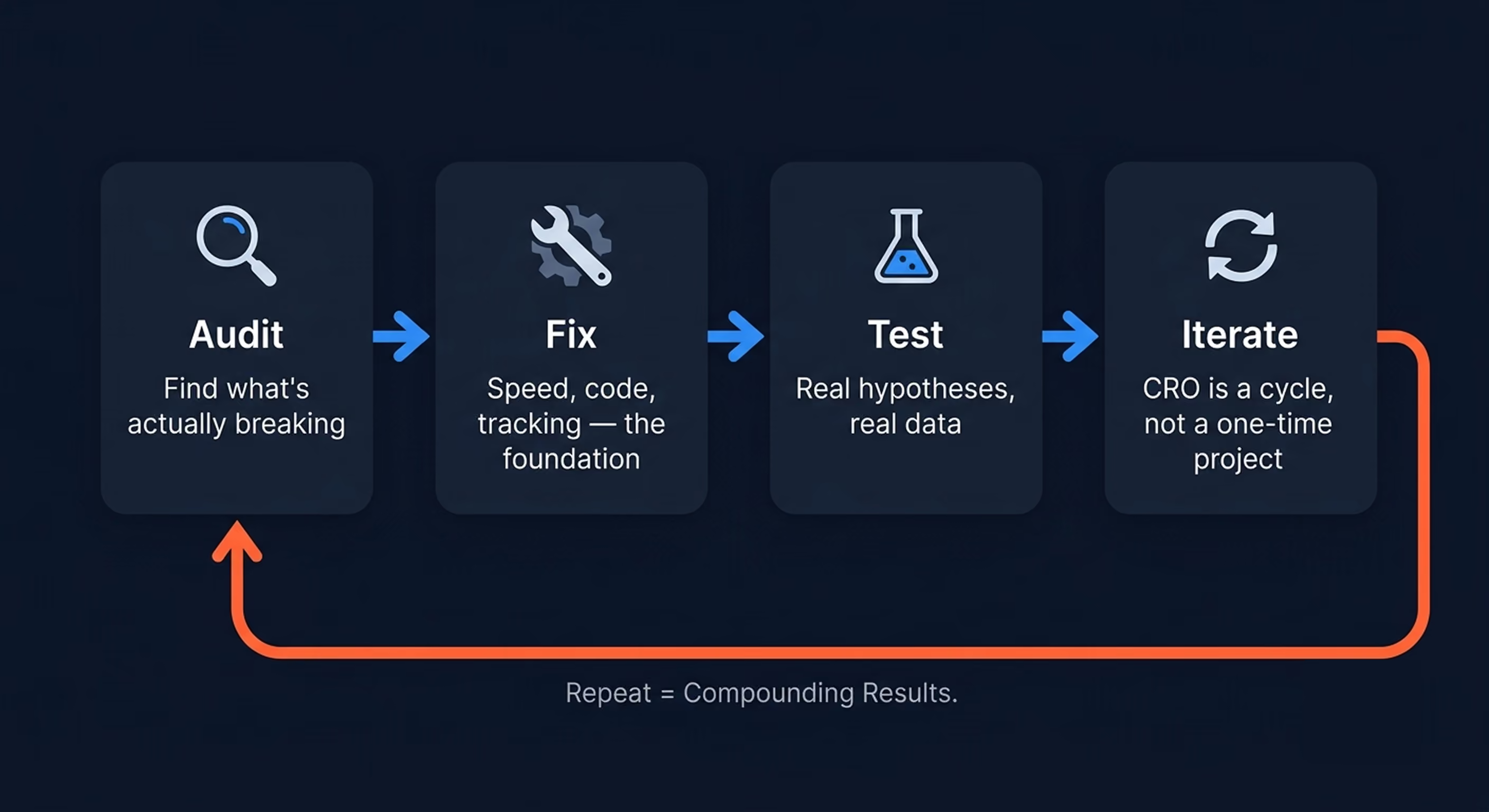
Here's what that system looks like, in order:
1. Audit — see exactly what's breaking, where visitors are dropping off, and what the data actually shows. Not guesses. Not best practices. Your specific website, your specific visitors.
2. Fix the Foundation — speed, code quality, proper tracking. You can't optimise a broken website. You can only make it fail faster.
3. Test Systematically — A/B tests with real hypotheses, run until statistical significance, logged and reported properly. One test at a time. One variable at a time.
4. Iterate — CRO is a cycle, not a project. You run the test, you read the result, you form the next hypothesis. Repeat. The compounding effect is where the real revenue lives.
If your website is getting traffic but not generating leads at the rate your business needs — the problem almost certainly isn't your marketing. It's what happens after the click.
That's what we fix.
Ready to Find Out What's Killing Your Conversions?
We run CRO Audits and 90-Day CRO Programmes for SaaS and B2B software companies doing $5M+ ARR.
If you want to know exactly what's breaking on your website — and have a structured system to fix it — that's where we start.
Frequently Asked Questions
Everything you need to know before getting started.
Most CRO agencies stop at recommendations.
We handle:
• strategy
• implementation
• testing
• optimization
No handoffs between teams.
No waiting on developers.
No “lost in translation” between strategy and execution.
You work directly with the person building the system — from analysis to deployment.
Some improvements happen quickly.
Fixing UX friction, messaging clarity, page structure, or speed issues can improve conversions within the first few weeks.
For larger gains through A/B testing and optimization cycles, timelines depend on your traffic volume and data collection speed.
The goal isn’t random tweaks.
It’s building a system that improves continuously.
That’s completely fine.
Most clients work with us because they don’t want strategy stuck waiting on developers.
We handle:
• implementation
• tracking
• testing
• optimization
No handoffs.
No project management chaos.
No execution bottlenecks.
We primarily work with:
• SaaS companies
• B2B services
• High-ticket offers
• Professional service businesses
The best fit is a business where improving conversion rates directly impacts revenue.
We are less focused on low-ticket eCommerce or high-volume consumer brands.
The program is built to improve the full conversion system, not just redesign pages.
You can access the pricing page to see what’s included
By the end of the program, you’ll have:
• validated insights
• improved conversion infrastructure
• tested winning variations
• a clearer optimization roadmap
From there, most clients either:
• continue optimization monthly
• expand testing into new funnels/pages
• or take the system internally with full documentation
The goal is long-term performance — not a temporary redesign.
Still have questions?
Let's talk. Book a quick call and we'll figure out if this is a good fit.
Limited Client Intake
we are only onboarding a small number of businesses while refining our CRO system.If you want direct implementation, testing, and optimization support — now is the best time to start.
